Playwright, CDP, and What AI Agents Actually Need From a Browser
AI coding agents have become a real part of how software gets built over the past year or so. They can write code quickly, but for any non-trivial work they also need to verify that what they wrote actually works (see my article on feedback loops when coding with AI) — and for frontend work, that most often means interacting with a browser. The tooling for this has developed quickly as a result. A year ago there was Playwright and some homegrown wrappers; now there's Playwright MCP, chrome-devtools-mcp, Claude in Chrome, firefox-devtools-mcp, a handful of Safari and Selenium MCP servers, and more appearing every month. It's a space that didn't really exist before agents needed it.
I've been using Playwright MCP for a few months now to let coding agents verify their work in the browser while I build securegpt.ru. It's worked well enough that I hadn't thought carefully about alternatives. Then just last week I installed the Claude in Chrome extension, noticed it was driving the browser differently — through CDP, with screenshots — and went looking for a clear explanation of how the two approaches actually differ. At first I had the impression that the main alternatives in these space are Playwright and CDP. The more I looked into it, the more I realized that framing was off.
The comparison that doesn't quite work
The framing I kept running into is Playwright MCP versus chrome-devtools-mcp — pick one, here's the tradeoff. But these two aren't really the same kind of thing. Playwright is a cross-browser automation framework that ships its own browser binaries and wraps them in a high-level API; chrome-devtools-mcp is a thin wrapper around Chrome's native debugging protocol, tied to one browser. You can use both as MCP servers, which is probably why people compare them directly, but they're optimizing for different things. Playwright wants breadth — one API across Chromium, Firefox, and WebKit. chrome-devtools-mcp wants depth — full access to what Chrome itself exposes to its developer tools.
Once I saw them that way, the real question stopped being "which one should I use" and became something more structured: what am I actually testing, and how much control do I need over the browser?
Browser vs. browser engine
To answer that question we need to first understand the difference between a browser and a browser engine. A browser engine is the part of the software that does the actual rendering — it takes HTML, CSS, and JavaScript and turns them into the pixels on the screen. A browser is the whole application built around an engine: the tabs, the address bar, the bookmarks, the sync, the extensions, the password manager, the privacy settings, and the OS integrations. Chrome is built on the Blink engine. Safari is built on WebKit. Firefox is built on Gecko. The engine is one component; the browser is the product.
There are really only three engines that matter today, and it's worth knowing which browsers use which.
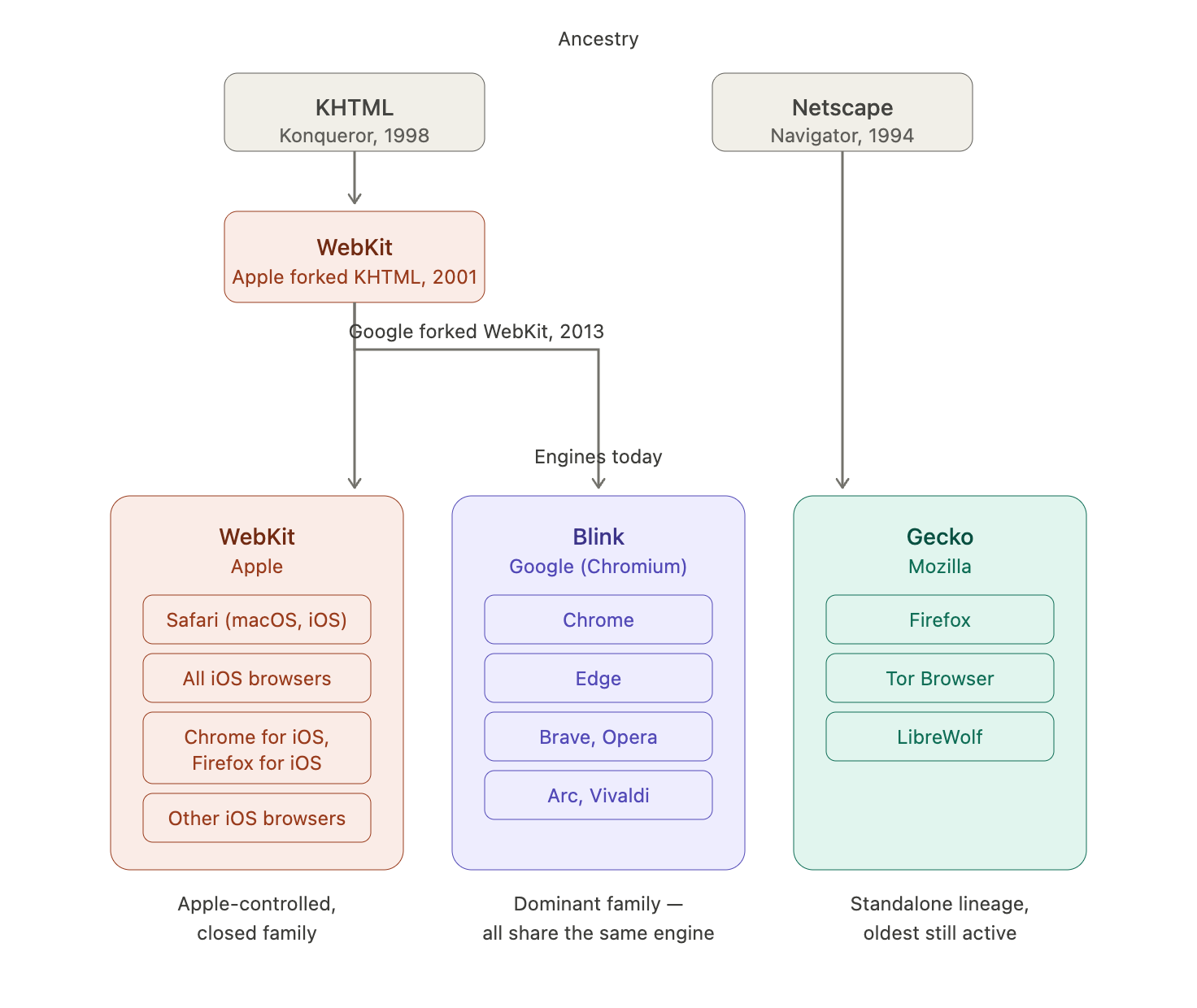
- Blink is the engine inside every Chromium-based browser — Chrome, Edge, Opera, Brave, Arc, Vivaldi. These all render near-identically because they share the engine; the differences between them are in the product layer.
- WebKit is Apple's engine, used in Safari on macOS and iOS. It's also what every browser on iOS is built on, because Apple requires it — so Chrome for iOS and Firefox for iOS are really those products' interfaces wrapped around Safari's engine.
- Gecko is Mozilla's engine, used in Firefox and a few privacy-focused forks like Tor Browser and LibreWolf. It's the only major engine that doesn't trace back to the WebKit lineage.
One thing worth noting: Blink was forked from WebKit in 2013. So Chrome and Safari share a common ancestor, but they've been diverging for over a decade. They're close relatives at the code level and still behave differently in enough ways to matter.
Playwright isn't testing the browsers you think it is
The reason the engine-vs-browser distinction matters is that Playwright, the default choice for most people, is operating at the engine layer by default — and most people don't realize it.
Playwright's pitch is that you write your test once and run it against Chromium, Firefox, and WebKit — real cross-browser coverage with one API. That's the promise that makes it attractive. But the way it delivers on that promise is worth understanding. When you install Playwright, it downloads three browser binaries into its own cache: a Chromium build, a Firefox build, and a WebKit build. These are not the browsers on your machine. The Chromium one is Chrome for Testing, a separate build channel Google maintains specifically for automation. The Firefox and WebKit ones are patched builds that Playwright's team compiles from upstream source, with their own automation protocol baked in. Stock Firefox and stock Safari don't speak that protocol, which is why you can't point Playwright at the Firefox or Safari you already have installed and have it work.
This is what makes the cross-browser story work. Rather than dealing with three different vendor automation protocols — each with its own quirks, release cycle, and capabilities — Playwright ships three engines that all speak a protocol it controls. That's how you get a unified API. The cost is that those three binaries aren't the actual browsers your users run. When you run a Playwright test against "Firefox," you're testing the Gecko engine in a standalone binary. You're not testing Firefox the product — your real profile, your extensions, your sessions, your sync. Same for WebKit: you're testing the engine Safari is built on, not Safari itself. For engine-level rendering work this is fine, because the engine is where most rendering bugs live. But the cross-browser coverage Playwright advertises is engine-level, not product-level, and the equivalence is weaker than the marketing implies. Anything that depends on the browser's product layer — Safari's Intelligent Tracking Prevention, Firefox's container tabs, real extensions, real OS-level integrations — doesn't show up at all.
The one exception is Chromium. Playwright lets you pass channel: 'chrome' or channel: 'msedge' to launch the real installed browser on your machine, and it lets you attach to an already-running Chrome over CDP. This works because CDP is effectively standardized across all Chromium builds — Playwright's bundled Chromium speaks the same protocol as your system Chrome, so the tool doesn't care which one it's driving. There's no equivalent for Firefox or Safari, because their real builds don't expose a protocol Playwright can hook into. The Chromium escape hatch isn't a feature Playwright built; it's a side effect of Chromium's debugging protocol being open and standardized. Firefox and Safari don't offer that, so the cross-browser abstraction stops being cross-browser in any meaningful sense for those two.
Browser-specific protocols fill in the gaps
The tools that do drive real Firefox and real Safari work by going through each browser's native automation protocol. This is the layer beneath Playwright — the protocols browsers themselves expose for external control. They're not unified, they're not equally capable, and which one you get depends entirely on which browser you're talking to.
Chrome
The richest is the Chrome DevTools Protocol, CDP. It's what Chrome's own DevTools panel uses internally, which means anything you can do by hand in DevTools you can do programmatically through CDP — deep performance traces, network request interception and modification, source-mapped stack traces from the console, arbitrary JavaScript execution in the page context, live DOM inspection. chrome-devtools-mcp is essentially a thin MCP wrapper around this protocol, which is why it's so capable in Chrome. Claude in Chrome also uses CDP, but from inside a browser extension via chrome.debugger.attach() rather than over a WebSocket from outside. Same protocol, different delivery.
Firefox
Firefox has its own automation protocols — historically Marionette, now increasingly WebDriver BiDi, a newer W3C-standardized protocol that's bidirectional like CDP and aims for similar capabilities. Mozilla ships firefox-devtools-mcp, which uses WebDriver BiDi through Selenium WebDriver to drive Firefox. It's catching up to CDP in terms of capability — network interception, rich debugging, event-driven control — but it's not quite there yet. The direction of travel matters, though: WebDriver BiDi is also being implemented by Chrome, and Safari will probably follow eventually. If that happens, the protocol fragmentation this whole section is about mostly goes away, and the distinction between "Playwright-style engine testing" and "browser-specific protocol" collapses. That's a few years out.
Safari
Safari is the weakest link. Safari exposes automation only through safaridriver, which speaks classic WebDriver — the older HTTP-based protocol that predates BiDi and CDP. WebDriver can drive the browser well enough for most testing: click, type, navigate, read the DOM, take screenshots. But it doesn't expose a debugger-grade surface. You can't run a real performance trace, you can't intercept network requests at the level CDP allows, you can't inspect the page with the depth chrome-devtools-mcp gives you for Chrome. This isn't a tooling gap anyone can close — it's a deliberate choice by Apple not to expose that surface, and no wrapper or MCP server can conjure it back. Community projects like safari-mcp-server exist, and they're useful for basic automation, but the ceiling is whatever safaridriver itself offers.
The decision matrix
All of this leads to two questions you can actually answer when picking a tool: what am I automating, and how much introspection do I need while I'm doing it?
What am I automating?
| Goal | Tool | Why |
|---|---|---|
| Cross-engine rendering (Chromium + Gecko + WebKit) | Playwright default | Only tool that covers all three engines with one API |
| Real Chrome or Edge with my sessions | Playwright channel: 'chrome', Playwright CDP attach, or chrome-devtools-mcp |
CDP is standardized across Chromium builds |
| Real Firefox with my sessions | firefox-devtools-mcp, or Selenium + geckodriver | Playwright's Firefox is a patched build, no channel hatch |
| Real Safari on macOS | Selenium + safaridriver, or safari-mcp-server |
No Playwright path; Apple requires safaridriver |
| Real iOS Safari | Appium + device or Xcode Simulator | No desktop tool captures iOS WebKit quirks |
| Any browser, unified API | Selenium or WebdriverIO | WebDriver is the only cross-vendor standard |
How much introspection do I need?
| Need | Tool | Ceiling |
|---|---|---|
| Click, type, navigate, screenshot | Any of them | WebDriver level — lowest common denominator |
| Auto-waiting, locators, modern ergonomics | Playwright | Selenium is catching up, Playwright still leads |
| Network request interception | Playwright, chrome-devtools-mcp, firefox-devtools-mcp | Only CDP and BiDi expose this richly |
| Source-mapped console stack traces | chrome-devtools-mcp | Where it visibly beats Playwright |
| Performance traces, Core Web Vitals, throttling | chrome-devtools-mcp | Built on DevTools directly |
| Debugger-grade introspection in Safari | Nothing | Apple hasn't exposed a DevTools-grade protocol. Hard ceiling. |
What I actually do
For most of what I've been doing oin my work — letting a coding agent verify that a feature renders and behaves correctly — Playwright is the right default. Its ergonomics are good, and engine-level testing catches the bugs the agent is likely to introduce. I use the CLI rather than the MCP server when I can, because every registered MCP server eats context budget continuously while a CLI only costs tokens when it's invoked. If your MCP doesn't have a CLI equivalent, mcporter can bridge the gap.
When I need to debug something Chrome-specific — a performance regression, a network request that's behaving oddly, a console error whose stack trace isn't helpful — I reach for chrome-devtools-mcp. It's a different tool with a different job, not a Playwright replacement. The two coexist fine.
I haven't needed real Firefox or real Safari often enough to set up that tooling for securegpt.ru, but if a user-reported bug turned out to be Safari-specific, Selenium with safaridriver is the path I'd take. For anything iOS-specific, Appium on a real device or the Xcode Simulator. These aren't fun to set up, but the alternative is not testing the thing at all, and that's worse.